山姆的編程實作分享。。。

Sam Blog, Sam Sharing, Sam Studio

顯示具有 App 標籤的文章。 顯示所有文章

2020年4月6日

[DART] Google 為何推出 Dart ?


Google 為何推出 Dart ?

官方說法

  • JavaScript 適合小型的script,當script 愈加龐大後,維護一個JavaScript Web app 就愈加困難了。

  • JavaScript 有時代的包袱,無法與時俱進,很多新的創意,或已存在像Python  好的做法都無法在JavaScript被採用。

以上這兩點我都同意,但以上兩點都不是壓倒駱駝的最後一根稻草,我個人認為還有一個不可說的秘密。

我先說一個情境,有工作經驗的你,相信對這情境會很有感;就是當一個點子出現時,而這點子不是對錯問題,而是路線問題時,最後這點子的執行往往落在上面的主事者,而非全員無異議通過。

而現今火紅的Android是Google 培養出的金雞母,但他的核心的程式語言就是Java,而Java 又掌控別人手裡 (Oracle),也就說Java核心的改動,不是Google 說的算,無疑的就掉入上面我說的情境了,你說Google 會不會想擺脫 Java 這個金箍咒 ?

而今,擁有Java 版權的 Oracle告Android 侵權的官司也還在進行式階段,換成你是Google,不會想推另一個自己孵出的程式語言 (DART) ?

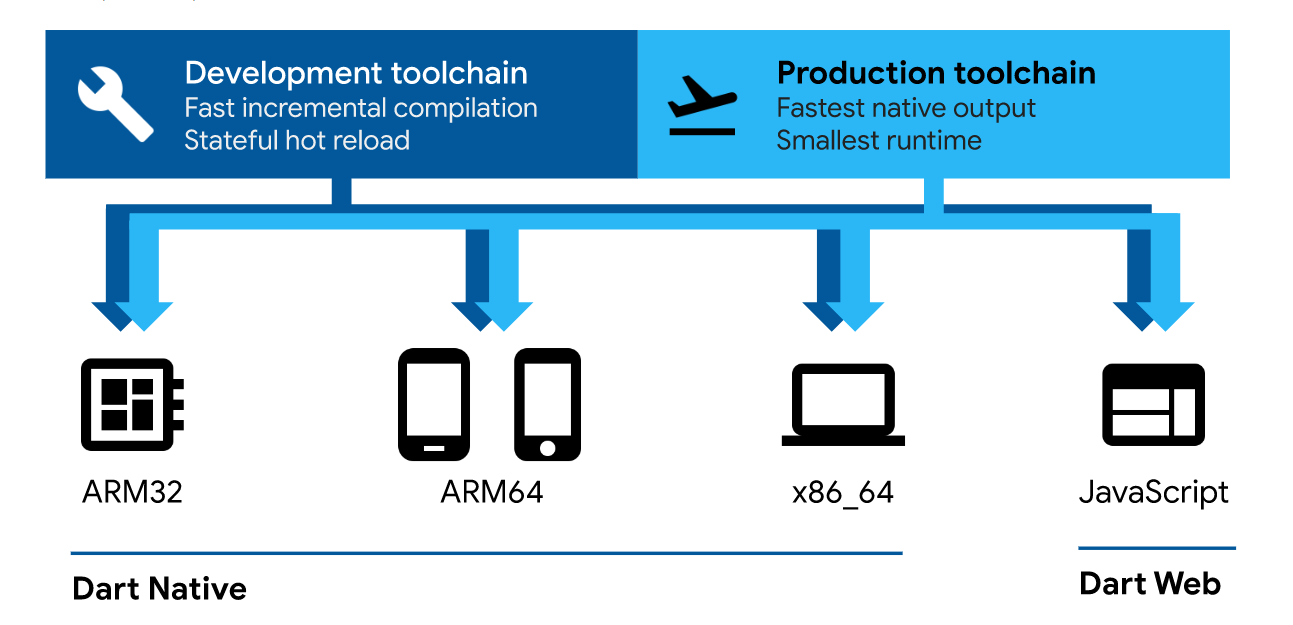
有空到DART 官網瞧瞧下面這圖的詳細的的說明,你就會發現DART就是生來取代Java的!


2020年4月3日

[Dart] 先從DartLang 開始吧 !


App 的設計工作,想說 DartLang 可以邊做邊學,直接從Flutter切入,
看來事與願違,對DartLang 的特性沒有全盤的認識,只是跟著做,
完全沒有主體意識!不知道以下這3點的原因,直接從Flutter切入,
過快了!
  • Optimized for UI
  • Productive development
  • Fast on all platforms
還是乖乖地,從 DartLang 開始吧 !


2020年1月13日

Flutter 讀書筆記 : What is Flutter?


What is Flutter ?

在 Flutter 官方網站 (flutter.dev), Google 是這樣說明 Flutter framework

Flutter is an app SDK for building high-performance, high-fidelity apps for iOS, Android and Web from a single codebase. (原文連接 :What is Flutter ?)

另外從這篇文章(Cross-Platform Mobile Development Using Flutter)可以得知
Flutter主要元件的組成:
  • Flutter engine: Written in C++, provide low-level rendering support using Google's Skia graphics library
  • Foundation Library: Written in Dart, Provides a base layer of functionality for apps and APIs to communicate with Flutter engine
  • Widgets: Basic building blocks for UI
在同篇文章中,作者用這張圖來說明 Flutter 是如何運作


在下一篇讀書筆記中,就讓我來說明Flutter framework 與其他 framework 的差異

延伸閱讀:
還在猶豫要不要跳入 Dart / Flutter ?
Google Flutter is ready for iOS, Android, Desktop (Mac, Linux, and Windows) and embedded devices, like Raspberry


2019年5月9日

Google Flutter is ready for iOS, Android, Desktop (Mac, Linux, and Windows) and embedded devices, like Raspberry


才在3天前 PO 文 ( 還在猶豫要不要跳入 Dart / Flutter ? ) , 建議大家可以開始研究一下 Flutter SDK,
就在昨天的 Google IO 2019的大會上, Google 更強化Flutter SDK了 / 或稱更接近他之前訂下的目標了 - Beyond Mobile (超越行動裝置)


底下是Google IO 2019 開發者大會針對 Flutter 的介紹
Developer Keynote (Google I/O '19) (Flutter 的Keynote 在55分鐘處)
Beyond Mobile: Building Flutter Apps for iOS, Android, Chrome OS, and Web (Google I/O'19)

在這段Google Flutter 介紹影片中, 可以看到Google 在 Dart / Flutter的努力, 你是否也隱約嗅到Google 為下一代Android OS催生而努力呢?

但至少我已經看到了 single Flutter codebase 現在不只是可以build出 iOS 和 Android app 而已, 還可build 出可以在desktop PC ( Mac, Linux, Windows) 上跑的app了, 甚至下一階段的 Embedded device - Raspberry...

所以, 想寫App 的你, 不要猶豫了, 可以一頭栽進去了😀


2019年5月6日

還在猶豫要不要跳入 Dart / Flutter ?


還在猶豫要不要跳入 Dart / Flutter ? 底下這篇文章或許可以幫你做出決定

Why you should use Google Flutter ?

以我個人使用過後的感想是 "值得投資".

原因如下:

1. 文章中的 "Fast development", "Flexible UI".... 等等的這些制式優點我就不再論述了.

2. Hot Reload 真的很酷,  不僅僅是在PC Emulator端可以做到Hot Reload, 連實機的debug都可做到, 這對工程師而言真的是一項開發福音. (PS: 事實上, iOS app的開發, 在Swift導入的同時也就一併提供這項功能.)

3. Performance / Speed: 從目前丟出來的一些數據真的不差, 代表它體質好!

4. Flutter is Free. 這項對大眾真的有感. 要做到 single codebase 可以build出 iOS 和 Android app, Flutter 並不是首例, 但是加上 "Free" 就真的是一項創舉了, 這對平台的推廣真的是一項大助力, 這也是我看好它會成功的原因之一, 畢竟Google 推的東西並不是樣樣成功😁.

5. Flutter is open source framework. 這項對個體戶而言就幫助不大了, 畢竟Resource有限, Resource要花在刀口上; 但就研發團隊而言就是另一項助力了. 因為受制於3rd party (=黑盒子)一直是軟體開發的一個痛, 而時效, 差異化往往又是產品成敗的關鍵. 所以對講求開發時程以及製作差異化的研發團隊而言open source 就是很大的優點. 想必這open source 的做法也是Google針對平台的推廣拉攏公司團隊下的一步棋.

一項產品的成功與否, 不是產品本身要好就可以了, 在我看來Flutter本身是一個很好又有潛力的開發平台, 它已具備成功的基因, 再加上 "Free" 以及 " Open Source" 這兩項因素, 個人認為它至少會是下一個Android App 共同開發平台,  所以我給它 "值得投資"的評語, 也因此我在年初也跳入 Flutter 開發行列, 你呢 ?

2015年1月26日

2015年1月7日

Swift Programming - Fallthrough statement


Swift 的控制轉移敘述 (control transfer statements)共有 break, continue, fallthrough  及 return 四種.

break, continue & return 與Objective-C 同, Fallthrough 是 Swift 新加入的.

Fallthrough 語法定義如下:
Fallthrough 有以下幾點特性:

1. Fallthrough 只會(能)出現在Switch 敘述中的case block

2. Fallthrough 不會檢查 case condition 且直接執行下一個 case block (或default case block)

3. Fallthrough 不能出現在最後ㄧ個 case block

資料參考自: Apple, The Swift Programming Language

2015年1月4日

Swift Programming - Switch statement


Swift 的 Switch statement 和 Objective-C 有以下幾點差異

1. 語法定義:

從語法上可以看到,我們不必在每個case statement 後加上break, Swift 會自動結束switch case 區段.

2. 從上面語法定義可以發現, Switch 增加 "where" 關鍵字,它(where condition)提供額外的條件敘述來加強case, 使case 條件更加嚴謹.
例如:
case (let x,  let y) where ( x == y )

3. 每個 case block 必須至少一個 statement, 如果真的沒有要執行的程式碼,那就請加上"break"吧.

The scope of each case can not be empty. As a result, you must include at least one statement following the colon (:) of each case label. Use a single break statement if you don’t intend to execute any code in the body of a matched case

資料來源: Apple, The Swift Programming Language

2014年12月29日

Swift Programming - For-In loop statement (迴圈敘述)


Swift 同Objective-C提供了 for, while 及 do-while 迴圈指令 ( loop control construct ), 除此之外, Swift 新增了 for-in loop control; 針對 array, dictionary 及 string 的應用, for-in 有他好用之處.

以下是他的語法定義:


以下我們就用playground來試用 for-in control statement


以下為array 的應用


以下為string 的應用


資料參考來自:
Apple, The Swift Programming Language.

2014年12月4日

Swift Programming - Tuples type (多元組 / 元組)


除了一般我們熟悉的資料型態外, Swift 加入了兩項Objective-C沒有的資料型態
1. Optional (選項型態)
2. Tuples (中文翻譯為 "多元組" or  "元組")

在iOS Computer Language 的世界,Tuples或許是新成員, 但是在Computer Language 的世界早已經可以看到它的足跡, 如C#, Python.

以下是它的語法定義:

從語法的定義可以知道它的宣告方式是由零到多種資料型態用分號分開再由小括號包覆的資料型態.

那Tuples要用在哪?就如 "Swift Programming Language" 文中所說的
Tuples are particularly useful as the return values of functions; Tuples are useful for temporary groups of related values. They are not suited to creation of complex data structures.

也就說,當你想回傳的參數不是單一值又不想定義ㄧ個資料結構時就可以使用Tuples.

另外,你也可以為每一個element命名
You can also name the elements of a tuple type and use those names to refer to the values of the individual elements. An element name consists of an identifier followed immediately by a colon (:).

Tuples常被用在錯誤的處理;
我們可以設想這樣的情境,當我們在處理error code的時候,如果只是回傳數字,對於程式設計員是足夠的且很好處理,但是對於終端的維修人員是可讀性低且必須查表才知道機器錯誤的原因,這是很不好的ㄧ種的設計; 相反的, 如果我們可以同時回傳字串的話那就比較符合人性.


資料參考來自:
Apple Inc. The Swift Programming Language.

2014年12月1日

Swift Programming - Optional type (選項型態)


除了一般我們熟悉的資料型態外, Swift 加入了兩項Objective-C沒有的資料型態
1. Optional (選項型態)
2. Tuples

選項型態 (optional type)在 "The Swift Programming Language" 文章中是這樣形容它的,

Optionals handle the absence of a value. Optionals say either “there is a value, and it equals x” or “there is not a value at all”. Optionals are similar to using nil with pointers in Objective-C, but they work for any type, not just classes. Optionals are safer and more more expressive than nil pointers in Objective-C.

所以選項型態 (optional type)可以說成:
某變數或常數
有值且等於某值(there is a value, and it equals x)
或
無資料(there is not a value at all)

從語法的定義可以知道它的宣告方式就是在型態名稱後加在?
至於加上!, 則是當確定有資料時,解開選項型態時使用


以下我們就利用Playground來體驗選項型態 (optional type)
從上圖可以發現,
1. 在列印時,因為possibleString 是選項型態,在字串前面會Optional關鍵字.
2. 如果你沒有給選項型態的變數或常數初值,Swift為自動設 "nil" .

下圖為!的使用範例

資料參考來自:
Apple, The Swift Programming Language.

2014年10月25日

Swift Programming - semicolons ( ; ,分號 )


分號(;)

不像 Objective-C, Swift 不需要在每段程式碼 (statement) 後加上分號,
但是如果你要在一行裡寫兩個 statements, 那麼你還是必需用分號來分隔兩個statement
例如:


資料參考自: Apple Inc. 「The Swift Programming Language。」 iBooks.

Swift Programming - println and print


println 及 print 是全域函數, 兩者的的差異則是println會在列印後加入跳行
以下為兩者差異的實例:


資料參考自:
Apple Inc. "The Swift Programming Language"
Apple Inc. "Swift Standard Library Reference"  

Swift Programming - Constant / Variable (常數 / 變數)


Swift 使用 var 關鍵字來宣告變數, 使用 let 關鍵字來設定常數

以下是用playground 試用Swift語言的程式碼


Swift並不需要你明確的指定資料形態,complier 會依照你給他的數值來決定他的資料型態
例如:


當然,你也可以在變數或常數後加上分號來明確的指定其資料型態,
例如:


另外數值的指定並不隱含資料形態的轉換,否則complie time就出錯了

例如:


你必須明確指定
例如:


完整的測試碼


資料摘錄自: Apple Inc. 「The Swift Programming Language。」 iBooks.

2014年10月23日

Swift Programming - Preprocessor / Header File (前置處理器 / 標頭檔)


以下是C++語言的Hello, World! 的範例程式

// 下面這行是標頭檔
#include <iostream.h>

// 下面是主程式
void main()
{
    count <<"Hello, World!\n";
}

我想上面這段程式, 這對學過C/C++語言的人應該熟悉不過了,
對於Swift語言, 又要如何撰寫來完成同樣的工作呢?

println("Hello, World!")

沒錯, 就這麼ㄧ行 !
不要懷疑,就ㄧ行code就可以完成C++同樣的工作.

在Swift語言,
1. 你不需要特別import 像 input, output 及 string處理函數的 library;所以不用像C++的Hello, World !程式去include <iostream.h>
2. 你不需要main 函數當作程式的開始位置
3. 你也不需要在每行程式碼的結尾加上分號

以下我們就來實作,在螢幕在顯示"Hello World"

Step1: 開啟Xcode,新增一個Project,然後選擇OS X Command Line Tool

Step2: 請選 "Swift" language, 其他隨你填

Step3: 最終Xcode會幫你產生如下的樣板 (template)

Step4: 請將 import Foundation 這行刪除或註解掉, 因為我們目前只用到簡單的Output函數.

Step5: 按下左上方執行按鈕後,就可在右下角Output視窗看到輸出結果

資料摘錄自: Apple Inc. 「The Swift Programming Language。」 iBooks.

2014年9月9日

Swift Programming - A Swift Tour in Playground


Swift Programming 有一種互動式的開發環境叫做Playground;
Playground 可以在還沒 Compile & RUN 的狀況下, 提供一個快速反應 coding 結果的編輯模式!

Step1: Open Xcode 6 then Select "File  -> New -> Playground"


Step2: Input file name of playground then press "Next", the playground file be created.


Step3: Xcode will create below template file for you, as you see, the right side shows the result of your code.


By the way, you can also create a playground file in your existing project, by following steps
StepA: In project navigator, press right button then select "New File"


StepB: Please select "Playground" as template


StepC: Input file name then press "Create", the playground file will be created in project navigator


2014年9月4日

Swift Programming – File difference between Objective-C and Swift


Continue Swift Programming- Hello Swift , we create a "Hello Objective-C" Application to compare the difference between Swift and Objective-C

Below is Objective-C Application file structure

Below is Swift Application file structure


The differences have
1. No header file (*.h)
2. the C file (*.m) has changed to Swift file (*.swift)


Swift Programming - Hello Swift


Step1: Install Xcode 6 beta from Apple Developer site
             Xcode 6 Beta version

Step2: Create new project with "Swift" language


   Select Single View Application 


   Select "Swift" language


Step3: Add a label - "Hello Swift" into storyboard


Step4: Build and Run App on Simulator


All steps are almost same as Objective-C development flow except step3, select "Swift" language.

2014年8月13日

Swift Programming – Resource


Apple Swift 官網 :
https://developer.apple.com/swift/

Apple Swift Blog :
https://developer.apple.com/swift/blog/

Xcode 6 beta version download :
https://developer.apple.com/swift/resources/

Swift presentation, Docs and Sample code :
https://developer.apple.com/swift/resources/

The Swift Programming Language 中文翻譯版本 :
http://tommy60703.gitbooks.io/swift-language-traditional-chinese/


2014年5月5日

Where does Xcode store git repository ?


Xcode stores git information in project folder but it has hidden attribute

You can try to use Terminal application to find it;
Below is an example of MyBMI project


As I said, use ls command, the .git does not been showed since it has hidden attribute. You need to use ls -al command to show all files/folders


Use git log command to read repository log


熱門文章